
Submission Details

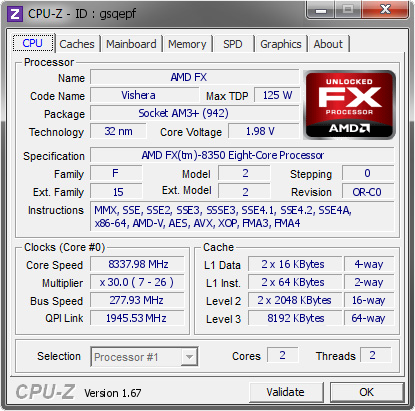
CPU Frequency
Score
8337.98 MHz
with




Copyright 2004-2026 by HWBOT GmbH. All rights reserved. HWBOT-WEB 3.7.61





Comments
all in all, great CPU
pscheck and rog connect ? have you try more volt ?
nice cpu !
Tried up to 2,10 Volt but it didn't scale. Basically PSCheck. Set the BCLK in the BIOS and set the multi in windows with PSCheck. Any chance that a Crosshair Formula-Z is better than the non Z version?
Nice Roman!
Top10 CPUz... nice!
Do you think its MB limit and not CPU limit? Does it feels like there is more in this CPU, when VCore doesn't scale?
Thanks
Yesterday Stefan and me were able to bench 1M at 8277 MHz twice. Usually the max frequency and max 1M clock are not within 60 MHz on AMD. That's why I think it should reach a higher max clock.
for me the non-z formula is better you can desabled all core from the bios . on the z version you can desabled module but no core .
Okay so I will stick to the non-z version and just try again. It could also be a thermal problem so I might try to polish the CPU and test a different TIM.
Nice Roman:)
Maybe try slow mode switch?
Great overall CPU.. amazing 1m
Have you tried enabling all cores, then setting 3 CU's to low frequency (~300mhz), instead of disabling the cores.
What I usually do is create 3 P-states.
Assign P4 state to all the shit cores (so they will be at the lowest power consumption), set P1 to the best core and do all the tweaks/apps, then take best core to P4. Wait a minute or so (to drop the temperature), then switch to P0 for validation.
It also works for SuperPI. Waiting at low clock to reduce temp and them upclock for bench. You can also assign explorer.exe to specific cores (the shit ones) so when you open an application, it will automatically select another core than the one you're pushing.
Crazy cpu dude.
did you tried all modules? I think CU1/CU2, CU3...Soemtimes is the best CU2 or CU1, not C0
Yea. CU3 is by far the worst with about 7,4 GHz max. CU2 does 7,6 max clock and CU0 8,1. CU1 is the best with 8338.
Very very nice CPU and great scores, can not come close to that frequency so for 32mil am having to work very hard on efficency. Roman you have set the bar really high, outstanding mate simply outstanding.
Log in or register to comment.